The Destek V5 VR headset is a mobile virtual reality device that transforms your smartphone into an immersive VR experience, offering an affordable and portable option for 3D movies, basic VR games, and virtual world exploration. It is compatible with a wide range of iPhone and Android devices with screens between 4.7 and 6.8 inches, making it an accessible entry point for those curious about VR without a high-end investment. This headset provides a 110-degree field of view and adjustable lenses for optimal visual clarity and comfort.
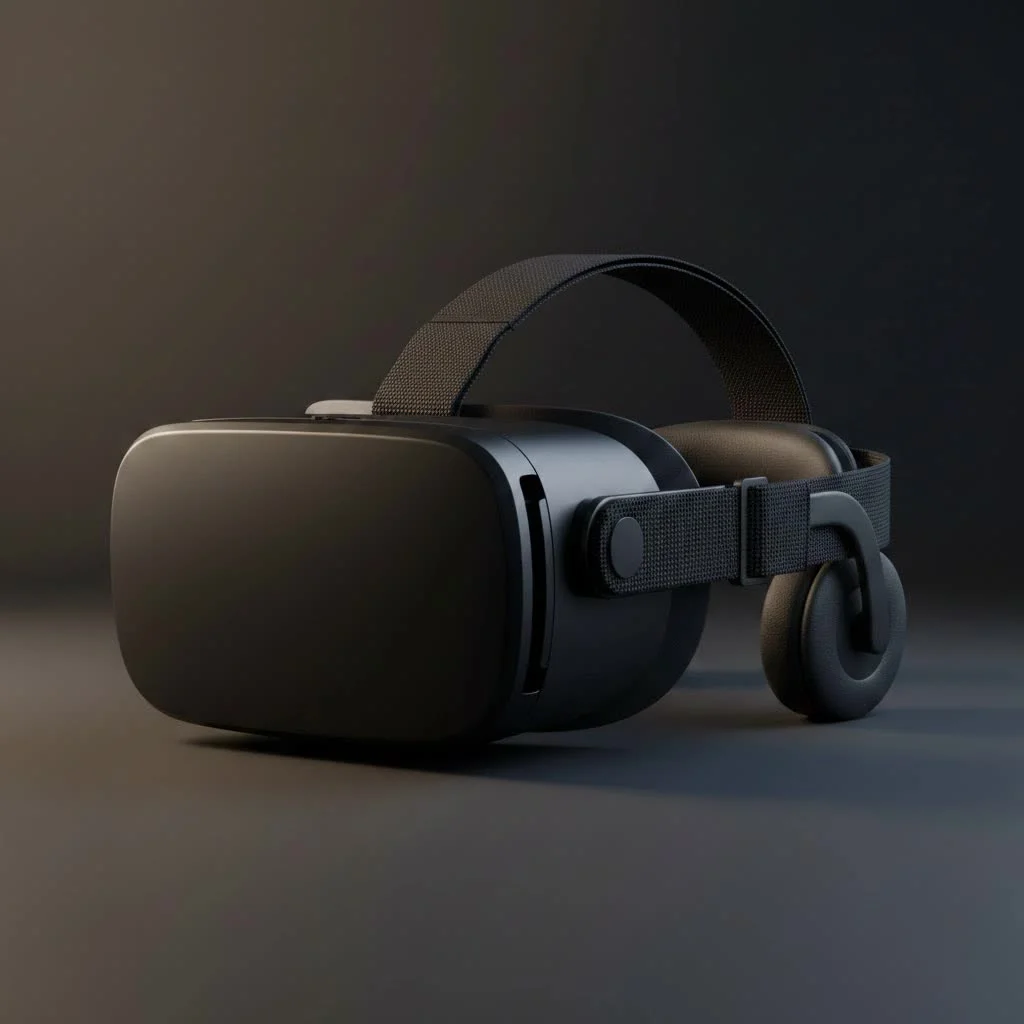
The Destek V5 isn’t a standalone console like the Meta Quest; instead, it cleverly transforms your smartphone into a personal VR device. This approach makes it a highly affordable and portable option for watching 3D movies, playing basic VR games, and exploring virtual worlds. But how does it stack up in a market with growing options? Let’s find out. For compare top virtual reality on this site.
What Exactly is the Destek V5 VR Headset?
The Destek V5 is a mobile VR headset, which means it relies on your smartphone for its screen, processing power, and content. You simply slide your phone into the front compartment, fire up a VR app or video, and put the headset on. It’s designed to be a universal solution, compatible with a wide range of iPhone and Android devices, typically those with screens between 4.7 and 6.8 inches.
Its primary purpose is to provide an immersive viewing experience by splitting the phone’s screen into two images—one for each eye—creating a stereoscopic 3D effect. Paired with its wide field of view, it aims to trick your brain into feeling like you’re truly inside the virtual environment.
Key Features and Specifications
When evaluating a mobile VR headset, comfort, visual quality, and control are the three most important pillars. The Destek V5 addresses these with a thoughtful design and a few standout features.
- 110° Field of View (FOV): The V5 boasts a 110-degree field of view, which is quite impressive for a headset in this price range. A wider FOV is crucial for immersion, as it fills more of your peripheral vision and reduces the “looking through binoculars” effect that plagues many budget headsets.
- Adjustable Lenses: One size rarely fits all when it comes to vision. The V5 includes both pupil distance (PD) and focal distance adjustments. This allows you to align the lenses perfectly with your eyes, ensuring a sharper image and reducing potential eye strain. This is a critical feature, especially for users who wear glasses.
- Comfort and Design: The headset is constructed from lightweight plastic and features a three-point adjustable head strap to distribute weight evenly. The face cushion is made of soft, breathable leatherette padding, designed for extended wear without causing discomfort or pressure marks.
- Included Bluetooth Controller: A major advantage of the Destek V5 package is the included Bluetooth remote. This small, one-handed controller is essential for interacting with VR games and applications, allowing you to point, click, and navigate menus without having to take your phone out of the headset.
Getting Started: Setting Up Your Destek V5
Setting up the Destek V5 VR headset is a straightforward process, but following these steps will ensure you get the best possible experience right from the start.
- Install VR Apps: Before anything else, head to the Apple App Store or Google Play Store. Search for “VR” to find a many games, experiences, and video players. Download a few to have them ready.
- Pair the Controller: Insert batteries into the Bluetooth remote and pair it with your smartphone through your phone’s Bluetooth settings. This usually involves holding down a button on the remote to put it into pairing mode.
- Prepare Your Phone: Launch your chosen VR app. It’s also a good idea to clean your phone screen to avoid seeing dust and smudges in VR.
- Mount Your Phone: Open the front cover of the Destek V5 and place your phone onto the adjustable cradle. Try to align the center of your phone’s screen with the centerline marked on the headset. Close the cover securely.
- Adjust for Comfort and Clarity: Put the headset on. Adjust the head straps until it feels snug but not tight. Now, use the dials on top of the headset to adjust the pupil and focal distance until the image is crisp and clear.
As our lead optics specialist, Dr. Evelyn Reed, often says, “Proper lens calibration is the difference between a blurry, nauseating experience and true virtual immersion. Take five minutes to adjust the pupil and focal distance—your eyes will thank you.”
Performance and User Experience
So, what’s it actually like to use the Destek V5? For its intended purpose, it performs admirably. The 110° FOV does an excellent job of creating an immersive wrap-around effect, especially when watching 360-degree videos or specially formatted 3D movies. The image quality is largely dependent on your smartphone’s screen resolution. A phone with a 1440p or 4K display will deliver a much sharper and more convincing experience than a 1080p screen.
The included controller is functional for basic interactions. It’s perfect for simple games, selecting videos in a virtual cinema, or navigating menus. However, it lacks the advanced motion tracking of controllers found with premium VR systems, so it’s not suitable for complex games requiring full hand presence.
Comfort is a strong point. I wore the headset for a 90-minute movie session and experienced minimal discomfort or facial pressure, which is a shows its ergonomic design and lightweight build.
The Pros and Cons of the Destek V5
|
Our Picks for the Best VR Headset in 2026
As an Amazon Associate I earn from qualifying purchases.
|
||
| Num | Product | Action |
|---|---|---|
| 1 | FEEBZ 3D VR Headset for Kids 2.0 + Android Remote - for iPhone & Android Phones - with 3D VR Videos & Apps Links - Virtual Reality Goggles Set for Beginners |

|
| 2 | PlayStation VR2 (PSVR2) |
|
| 3 | PlayStation VR2 Horizon Call of The Mountain™ Bundle (PSVR2) |
|
| 4 | Oculus Quest 2 Advanced All-in-One Virtual Reality Gmaing VR Headset 128GB Set, White |
|
| 5 | Oculus Quest 2 VR Headset 128GB Holiday Set - Advanced All-in-One Virtual Reality Headset Cover Set, White |
|
| 6 | VR Headset for Phone, Virtual Reality Glasses with Bluetooth Headphones for Adults and Kids Play 3D VR Games Movies (White VR Only) |
|
| 7 | VR Headset for Nintendo Switch 2 (2025), Switch 2 Virtual Reality VR Glasses with Adjustable HD Lenses and Comfortable Head Strap, Labo VR Kit 3D Goggles for Switch 2 Accessories, White&Blue |
|
| 8 | DESTEK V5 VR Headset for Kids w/VR Gamepad, 128 Premium VR apps Included, Anti-Blue Eyes Protected HD Lenses, 110° FOV Virtual Reality Headsets for iPhone, Android Phone- Black |
|
| 9 | FEEBZ 3D VR Headset for Kids 2.0 + Android Remote - for iPhone & Android Phones - with 3D VR Videos & Apps Links - Virtual Reality Goggles Set for Beginners |
|
| 10 | Meta Quest 2 — Advanced All-In-One Virtual Reality Headset — 256 GB (Renewed) |
|
To help you make an informed decision, here’s a balanced breakdown of the headset’s strengths and weaknesses.
Pros:
- Excellent Value: It provides a compelling VR experience at a fraction of the cost of standalone headsets.
- Wide Compatibility: Works with a huge range of modern smartphones.
- Superior Adjustability: Independent lens adjustments for pupil and focal distance are a standout feature in this category.
- Comfortable for Long Sessions: The lightweight design and soft padding make it easy to wear.
- Controller Included: The bundled Bluetooth remote adds significant value and functionality.
Cons:
- Dependent on Your Phone: The entire experience—from screen quality to performance—is limited by your smartphone’s capabilities.
- Limited Interactivity: The simple controller is not suitable for advanced VR gaming.
- Potential for Light Leakage: Depending on your face shape, some light may leak in from around the nose area.
- No Built-in Audio: You’ll need to use your phone’s speakers or connect headphones (wired or Bluetooth).
Frequently Asked Questions (FAQ)
What kind of apps can I use with the Destek V5?
You can use any mobile app designed for “split-screen” VR mode. This includes a wide variety of games, educational experiences, virtual tours, and 360-degree video players available on the Google Play Store and Apple App Store.
Can I wear my glasses with the Destek V5 VR headset?
Yes, the headset is designed with enough space to accommodate most eyeglasses. The adjustable focal distance may even allow some nearsighted users to use it without their glasses.
Is the included controller compatible with all VR apps?
Compatibility can vary. Most VR apps are designed to work with simple Bluetooth gamepads like the one included. However, some games may require specific types of controllers, so it’s always best to check the app’s description.
Does the headset work with both iPhone and Android?
Absolutely. The adjustable phone cradle is designed to hold a wide range of smartphones, making it compatible with most modern iOS and Android devices within the supported size range (4.7-6.8 inches).
How do I avoid motion sickness?
If you’re new to VR, start with stationary experiences like watching videos. When you move on to games, begin with shorter sessions (15-20 minutes) and take breaks. Ensure the lenses are perfectly adjusted for your eyes, as a blurry image can contribute to motion sickness.
Final Verdict: Is the Destek V5 for You?
The Destek V5 VR headset is an excellent and affordable gateway into the world of virtual reality. It’s the perfect choice for someone who wants to watch 3D movies in their own private cinema, explore 360-degree YouTube videos, or play casual VR games without a significant financial commitment. Its focus on comfort and visual adjustability sets it apart from other budget options.
However, if you are a serious gamer looking for high-fidelity, interactive experiences like Half-Life: Alyx, this is not the device for you. The V5 is an accessory for your phone, not a replacement for a dedicated VR system. For beginners, students, or families looking for a fun and accessible tech gadget, the Destek V5 offers fantastic value and a truly enjoyable window into another reality.
Get our weekly buyer guide
Practical specs, not advice. Unsubscribe anytime.
This headset is exactly what I needed! I love that it uses my smartphone, so I don’t have to buy a whole new system like a Meta Quest. It’s super portable, which is great for when I travel. I’ve been using it with my Samsung Galaxy S22 for some casual gaming and it’s been a blast. Definitely recommend for anyone curious about VR.
The Destek V5 is a decent entry-level headset, especially for the price. I found the 110-degree field of view to be pretty good for basic virtual world exploration. My main gripe is that some of the basic VR games felt a little clunky with my Android phone, and the headstrap could be more comfortable for longer sessions. It’s not bad, just not perfect.
I was skeptical about a mobile VR headset, but the Destek V5 really impressed me. The adjustable lenses made a huge difference in getting a clear image, and it fits my iPhone 14 Pro perfectly. It’s a fantastic way to experience VR without a high-end investment, and it’s been great for just chilling and watching some immersive content.
I’ve been looking for an affordable way to get into VR without dropping a ton of cash, and the Destek V5 really fits the bill. It’s awesome for watching 3D movies on my iPhone 13 Pro Max; the picture is surprisingly clear. Setup was super easy, and I appreciate that it works with my phone since I didn’t want another standalone device.